原因
如果是在有无线网卡的电脑上启用了 WSL2,目前已知在切换不同 WiFi 后,就会遇到这种 WSL2 突然连不上网的情况。 如果有线网络和无线网络交替使用,也会出现这种问题。总之,只要交替使用不同的网络,WSL2 就可能联不上网……
这时候如果在 Linux 子系统运行 apt update 或 yum update 会网络超时,如果 ping 域名,有的有回显,但反应很慢,有的直接无法解析域名。
最直接的判断方法是在 WSL Linux 子系统中用 nslookup 查看域名解析:
nslookup www.nabuyiyang.top
会出现类似 communications error to 172.28.240.1#53: timed out 这样的提示。说明 WSL2 自动配置的 NAT 网络出问题了,导致域名无法正常解析。
方案 1
先说一个解决方案:
以管理员身份运行命令提示符或者 Powershell:
wsl --shutdown
netsh winsock reset
netsh int ip reset all
netsh winhttp reset proxy
ipconfig /flushdns
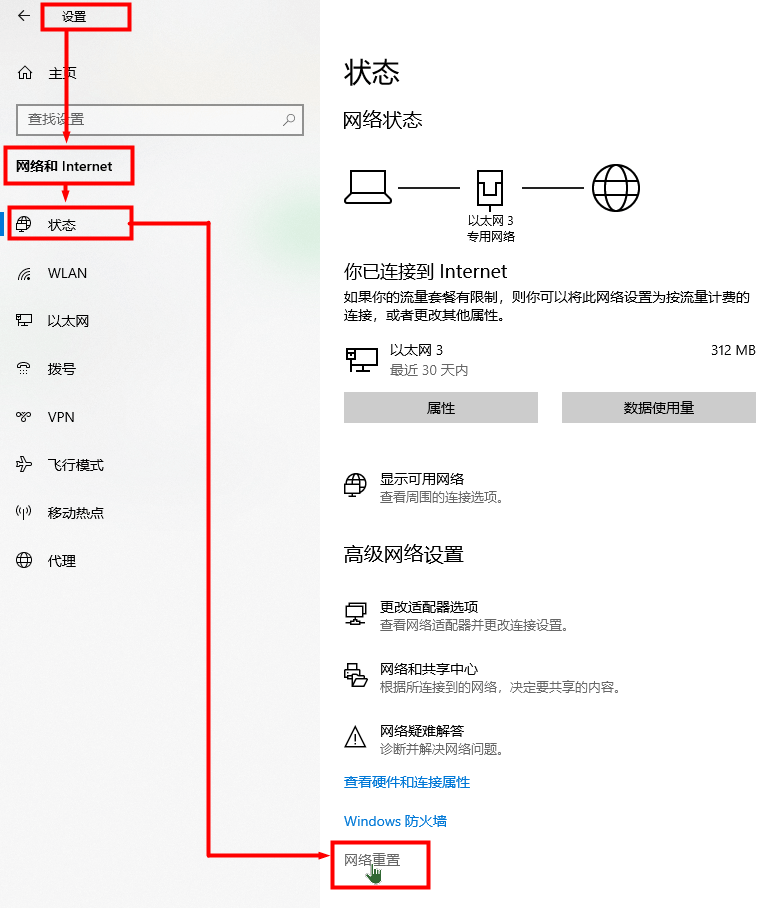
然后进入 Windows 设置 - 网络和 Internet - 状态 - 网络重置:
方案 2
给 WSL2 和 Host 设置静态 IP 地址,每次重启 Host 或 WSL2 后运行:
@ECHO OFF
wsl -d Ubuntu-20.04 -u root ip addr del $(ip addr show eth0 ^| grep 'inet\b' ^| awk '{print $2}' ^| head -n 1) dev eth0
wsl -d Ubuntu-20.04 -u root ip addr add 192.168.50.2/24 broadcast 192.168.50.255 dev eth0
wsl -d Ubuntu-20.04 -u root ip route add 0.0.0.0/0 via 192.168.50.1 dev eth0
wsl -d Ubuntu-20.04 -u root echo nameserver 192.168.50.1 ^> /etc/resolv.conf
powershell -c "Get-NetAdapter 'vEthernet (WSL)' | Get-NetIPAddress | Remove-NetIPAddress -Confirm:$False; New-NetIPAddress -IPAddress 192.168.50.1 -PrefixLength 24 -InterfaceAlias 'vEthernet (WSL)'; Get-NetNat | ? Name -Eq WSLNat | Remove-NetNat -Confirm:$False; New-NetNat -Name WSLNat -InternalIPInterfaceAddressPrefix 192.168.50.0/24;"
方案 3
因为是域名解析出现问题,可以直接停用/etc/resolv.conf的自动生成,并手动指定 DNS 服务器:
- 在/etc/wsl.conf中加入:
[network] generateResolvConf = false - 关闭 WSL 后重新启动:
wsl --shutdown - 修改/etc/resolv.conf
nameserver 223.5.5.5
nameserver 223.6.6.6